Local LLM Deployment: A Practical Guide for Businesses
A practical guide to local LLM deployment for businesses: hardware requirements, model selection, inference setup, and integration with existing systems.
Local LLM Deployment: A Practical Guide for Businesses
Your company needs AI. But sending proprietary data to someone else's servers? That's a risk you don't have to take. Here's how local LLM deployment actually works, what it costs, and how to decide if it's right for your business.
▸ Your Employees Are Already Using ChatGPT
Let's start with the uncomfortable truth. Right now, someone at your company is pasting client data, financial projections, or internal strategy docs into ChatGPT. They're not doing it to be reckless. They're doing it because AI is genuinely useful, and you haven't given them a sanctioned alternative.
This is the shadow AI problem, and it's happening at nearly every mid-size company I work with.
The question isn't whether your team should use AI. They already are. The question is whether you control where that data goes. Local LLM deployment gives you that control. You run the AI models on your own hardware, inside your own network. No data leaves your building.
But "run AI locally" can sound intimidating if you're not a machine learning engineer. This guide breaks it down for business leaders: what local deployment actually involves, what it costs, and how to get started without a PhD.
▸ What Is Local LLM Deployment, Exactly?
A large language model (LLM) is the technology behind tools like ChatGPT. It reads text, understands context, and generates useful responses. When you use ChatGPT, your data travels to OpenAI's servers for processing. When you deploy an LLM locally, the model runs on hardware you own, in a location you control.
That means:
- ▹Your data never leaves your network. Client files, contracts, financial records, patient information: it all stays in-house.
- ▹No third-party access. OpenAI, Microsoft, and Google can't train on your data or be subpoenaed for it.
- ▹No per-user subscription fees. Once the hardware is set up, you're not paying $30/month per employee.
- ▹Full customization. You can fine-tune models on your own data and workflows.
Think of it like the difference between Google Docs and a local file server. Both work. But one sends everything to someone else's infrastructure, and the other keeps it under your roof.
▸ Who Should Consider Local LLM Deployment?
Not every company needs to run AI locally. If you're a 10-person marketing agency working with public data, ChatGPT Team is probably fine.
But local deployment makes strong sense if:
- ▹You handle regulated data. Healthcare (HIPAA), legal (attorney-client privilege), finance (SOC 2, PCI-DSS), government contracting (ITAR, CMMC). If your compliance officer would flinch at the phrase "we paste it into ChatGPT," local is worth exploring.
- ▹You have 50+ employees using AI regularly. At scale, per-seat subscriptions add up fast. A $30/user/month tool costs $18,000/year for just 50 people, and that's the basic tier.
- ▹You want to build AI into internal workflows. Document review, contract analysis, customer support drafting, internal knowledge bases. These use cases need customization that cloud tools can't provide.
- ▹Your clients care about data sovereignty. If you're a law firm or MSP and your clients ask "where does our data go?", local deployment is a concrete answer.
▸ What Hardware Do You Actually Need?
This is where most guides go off the rails with GPU specifications and VRAM calculations. Here's what you need to know as a business leader.
The Short Version
For a team of 10-50 people running a capable local LLM, you're looking at a dedicated server with a high-end GPU. Not a supercomputer. Not a data center. One machine, roughly the size of a desktop tower.
The Real Numbers
| Setup | Team Size | Capability | Hardware Cost | Monthly Operating Cost |
|---|---|---|---|---|
| Starter | 5-15 users | General text tasks, drafting, Q&A | $5,000-$8,000 | ~$50-80 (electricity) |
| Professional | 15-50 users | Document analysis, RAG on internal docs, higher throughput | $12,000-$20,000 | ~$100-150 (electricity) |
| Enterprise | 50-200 users | Multiple models, heavy workloads, redundancy | $30,000-$60,000 | ~$200-400 (electricity) |
Compare that to ChatGPT Enterprise at $60/user/month. For 50 users, that's $36,000 per year, every year. A professional local setup pays for itself in under a year, and you own the hardware.
What Goes Into the Box
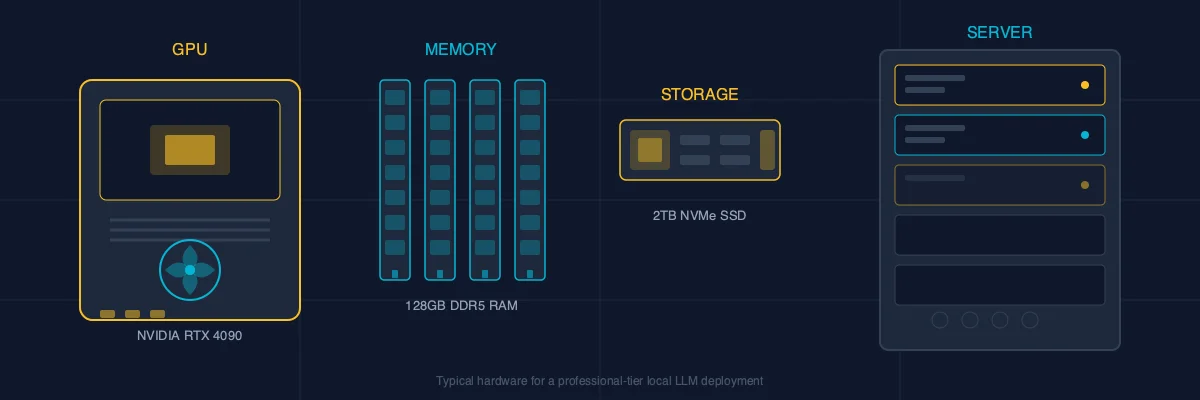
- ▹GPU: This is the engine. NVIDIA GPUs are the standard. A single NVIDIA RTX 4090 (~$2,000) can run 70-billion parameter models. For heavier workloads, an A6000 or dual-GPU setup adds capacity.
- ▹RAM: 64GB minimum, 128GB preferred. The model loads into memory, so more is better.
- ▹Storage: 2TB NVMe SSD. Models are large (a good one is 30-70GB), and you'll want room for your document index.
- ▹CPU: Any modern workstation processor. The GPU does the heavy lifting.
Your IT team can spec and build this. It's not exotic hardware. If they can set up a file server, they can set up an inference server.
▸ Choosing the Right Model
You don't need to train an AI model from scratch. Open-source LLMs are remarkably capable, and new ones release regularly. Here's the landscape in early 2026.
Models That Work Well for Business
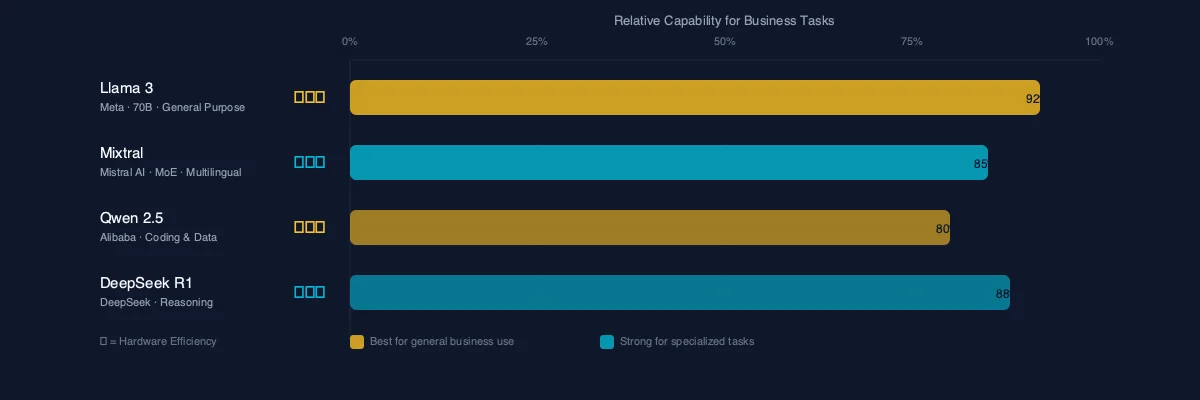
- ▹Llama 3 (Meta): The workhorse. Available in multiple sizes (8B, 70B, 405B parameters). The 70B version hits a sweet spot of capability and hardware requirements.
- ▹Mistral/Mixtral: Strong performance, especially for European language support. Mixtral uses a "mixture of experts" approach that's efficient on hardware.
- ▹Qwen 2.5 (Alibaba): Excellent for coding tasks and structured data. Strong multilingual capabilities.
- ▹DeepSeek R1: Strong reasoning capabilities. Good for analytical tasks, though evaluate data governance implications given its origin.
How to Think About Model Selection
Bigger isn't always better. A 70-billion parameter model running on your own hardware will handle 90% of business use cases: drafting emails, summarizing documents, answering questions about internal policies, reviewing contracts for key terms.
The 400B+ models offer marginal improvement for most business tasks but require significantly more expensive hardware. Start with what works, then scale if needed.
▸ The Software Stack: What Runs the Show
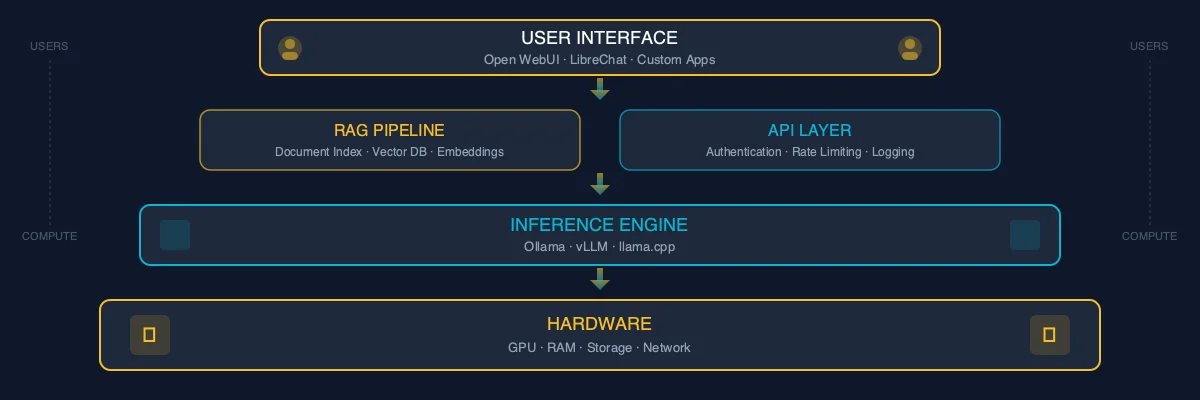
The hardware runs the model. The software makes it usable for your team. Here's the typical stack.
Inference Engine
This is the software that actually runs the model. The leading options:
- ▹Ollama: The simplest option. Install it, pull a model, it runs. Built for exactly this use case.
- ▹vLLM: Higher performance for multi-user setups. More configuration required.
- ▹llama.cpp: Lightweight, runs on consumer hardware. Good for smaller deployments.
User Interface
Your employees need something that looks like ChatGPT, not a command line.
- ▹Open WebUI: The most popular option. It looks and feels like ChatGPT. Supports multiple users, conversation history, and document uploads. Free and open source.
- ▹LibreChat: Another solid option with multi-model support.
RAG (Retrieval Augmented Generation)
This is where local deployment gets powerful. RAG connects your LLM to your company's documents: the employee handbook, client files, project documentation, SOPs. When someone asks a question, the system searches your documents first, then uses the LLM to generate an answer based on your actual data.
This turns a general-purpose AI into a company-specific AI that knows your business.
▸ What a Real Deployment Looks Like
Here's the typical timeline for a mid-size company deploying a local LLM.
Week 1-2: Assessment and Planning
- ▹Audit current AI usage (find the shadow AI)
- ▹Identify the top 3-5 use cases your team actually needs
- ▹Spec hardware based on team size and workload
- ▹Plan network and security configuration
Week 3-4: Setup and Configuration
- ▹Procure and configure hardware
- ▹Install inference engine and UI
- ▹Set up user accounts and access controls
- ▹Configure RAG pipeline with initial document set
Week 5-6: Testing and Training
- ▹Pilot with a small group (5-10 power users)
- ▹Gather feedback, tune model selection and parameters
- ▹Document workflows and create user guides
- ▹Train the broader team
Week 7-8: Rollout and Optimization
- ▹Company-wide deployment
- ▹Monitor usage and performance
- ▹Expand document library for RAG
- ▹Establish governance policies
Two months from decision to deployment. That's not a multi-year enterprise project. It's a focused initiative with clear milestones.
▸ The Cost Reality: Local vs. Cloud
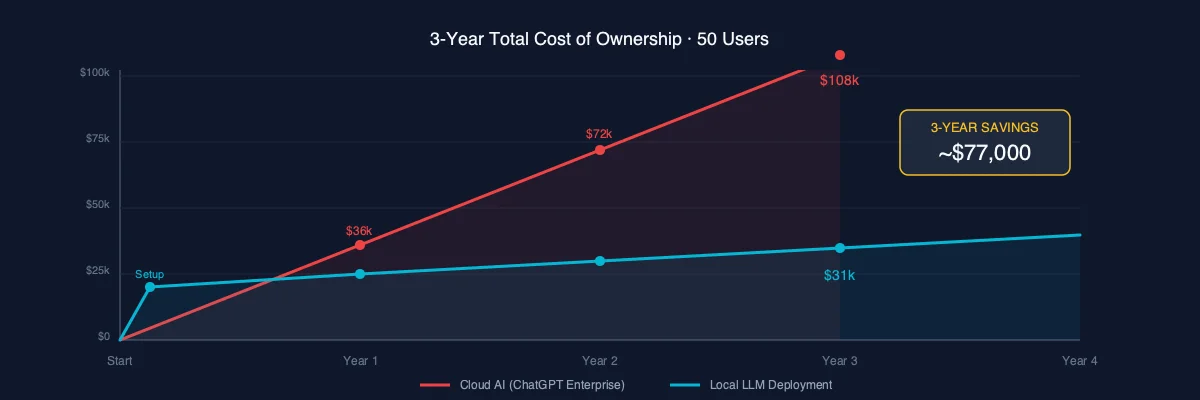
Let's put real numbers on the table. Here's what a 50-person company actually pays.
Cloud AI (ChatGPT Enterprise)
- ▹$60/user/month × 50 users = $36,000/year
- ▹Year 2: $36,000
- ▹Year 3: $36,000
- ▹3-year total: $108,000
- ▹And your data lives on OpenAI's servers the entire time.
Local LLM Deployment
- ▹Hardware (professional tier): $15,000 (one-time)
- ▹Setup and consulting: $5,000-$10,000 (one-time)
- ▹Electricity: ~$1,500/year
- ▹Maintenance/updates: ~$2,000/year
- ▹3-year total: $30,500-$35,500
- ▹Your data never leaves your building.
That's roughly a third of the cost over three years. And you own the hardware at the end.
The math gets even better at scale. At 100 users, the cloud cost doubles. The local cost barely moves.
▸ Common Concerns (Answered Honestly)
"Is local AI as good as ChatGPT?"
For most business tasks, the gap has closed dramatically. Open-source models in 2026 match or exceed GPT-4 level performance for text generation, summarization, and analysis. Where cloud still leads: cutting-edge reasoning tasks, image generation, and real-time web search integration. For 90% of daily business use, you won't notice a difference.
"What about maintenance?"
Updating a local LLM takes about as much effort as updating any other server software. Pull the new model, test it, deploy. Your IT team already does this with other systems. Budget 2-4 hours per month for ongoing maintenance.
"What if the hardware fails?"
Same as any critical server. Set up monitoring, keep backups, and consider a redundant setup for mission-critical deployments. If the AI server goes down, your team loses a productivity tool temporarily. If your data leaks from a cloud provider, that's a different scale of problem entirely.
"Can we start small?"
Absolutely. The best deployments start with a single team and a specific use case. Get one department running well, prove the value, then expand. You don't need to boil the ocean on day one.
▸ When Local Isn't the Right Answer
Honesty matters more than a sale. Local LLM deployment isn't always the best choice.
Skip local if:
- ▹You have fewer than 10 AI users and no compliance requirements. ChatGPT Team is simpler and sufficient.
- ▹You need cutting-edge multimodal capabilities (video, advanced image generation). Cloud models lead here.
- ▹You have zero IT staff. Someone needs to manage the hardware, even if setup is handled by a consultant.
- ▹Your use case is primarily web search augmented. Cloud tools integrate real-time search better.
Go local if:
- ▹You handle regulated or sensitive data. Period.
- ▹You have 50+ users. The economics are clear.
- ▹You want to own your AI infrastructure, not rent it.
- ▹Your clients or partners require data sovereignty.
▸ Getting Started
If you've read this far, you're probably in the "this makes sense but I need help executing" stage. That's exactly where consulting delivers value.
Here's what I recommend:
- ▹Audit your current AI usage. Find out what tools your team is already using and what data is flowing through them. You'll likely be surprised.
- ▹Identify your top use cases. Not "AI for everything." Pick 3-5 specific workflows where AI saves real time.
- ▹Talk to someone who's done this. Not a vendor selling platforms. A practitioner who has actually deployed local LLMs for businesses like yours.
I publish my consulting rates on brianstory.com because I think you deserve to know what things cost before you pick up the phone. If local LLM deployment sounds right for your business, take a look and book a consultation. No pitch deck. Just a conversation about what makes sense for your situation.
Brian Story is an AI consultant specializing in private LLM deployment for mid-size businesses. He publishes his pricing because he believes transparency builds trust. Learn more at brianstory.com.
Need AI Strategy That Actually Works?
Let's cut through the noise. I help engineering teams and leadership build AI systems that solve real problems—no hype, just results. From RAG pipelines to production deployments.
Get AI insights delivered
Practical AI engineering tactics. No fluff, no spam.