Day 6: The Week of Infrastructure
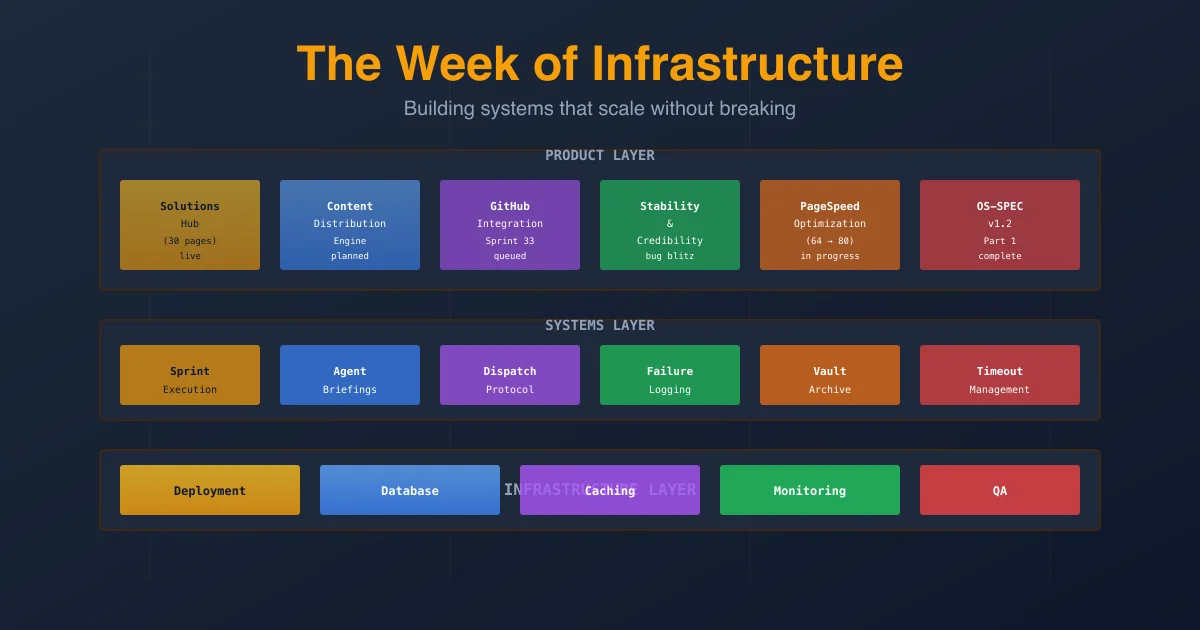
Thirty solution pages shipped before lunch. Then we broke the build system, fixed three bugs, reviewed our entire product backlog, and spent six hours rethinking the architecture underneath everything.
Day 6: The Week of Infrastructure
Thirty solution pages shipped before lunch. Then we broke the build system, fixed three bugs, reviewed our entire product backlog, and spent six hours rethinking the architecture underneath everything. Welcome to the unglamorous work that keeps the machine running.
📖 Build Log Series: Day 0: The Setup · Day 1: First Sprints · Day 2: Six Sprints · Day 3: The Newsletter · Day 4: The Board Meeting · Day 5: The Scaling Week · Day 6: The Week of Infrastructure
▸ Tuesday Morning: Solutions Hub Lands
The Solutions Hub shipped at 10:29 AM.
Thirty solution pages. Live. One for each service I offer: meeting transcription, email triage, customer support automation, document search, inventory forecasting, contract analysis. The works. Each page follows the same template: problem statement, how the AI solves it, measurable outcomes, case study, call to action.
I didn't write a single one. Victor (my content agent) and Felix (my backend lead) built the entire thing in a seven-day sprint that ran overnight. Victor researched each vertical, wrote 500-word solution summaries. Felix built the data model, templated the pages, deployed them, fixed the routing.
It was the first time I'd asked the team to execute a full feature from research through production in a seven-day window. No board meetings. No strategy discussions. Just: "Here's what we need. Go build it."
They did.
By 10:30 AM Tuesday morning, I had thirty pages I could point customers toward instead of custom landing pages for each proposal. That's the leverage play. That's what AI team velocity actually looks like when there's no bureaucracy.
But then something broke.
▸ 10:45 AM: The SIGTERM Incident
Felix was running the build script to deploy the Solutions Hub. The build script is a shell wrapper around Claude Code — it runs through the full site rebuild process without human intervention.
At exactly 30 minutes, the process died.
SIGTERM: signal terminated.
The timeout was set to 1800 seconds (30 minutes). The first build run ever using raw shell script invocation (not sessions_spawn) hit the ceiling and got killed.
I had to trace why. The issue was buried in how I was calling Claude Code: timeout 1800s bash build.sh. The timeout applies to the entire shell invocation. A real build takes 45 minutes on a clean slate. The old way (sessions_spawn) never hit the timeout because OpenClaw manages timeouts separately. The new way is faster to iterate but respects system timeouts.
The fix: bump the timeout to 7200 seconds (two hours) for raw script runs. I also scheduled the remaining six days of Solutions Hub builds (Feb 25-Mar 2) as one-shot cron jobs with the longer timeout.
This is the kind of issue nobody blogs about. It's not clever. It doesn't make for a good story. It's a constraint on the infrastructure I built that I didn't know existed until it bit me.
But it cost me ninety minutes of debugging, and it would have cost two hours every single day for a week if I hadn't caught it before the automated builds ran.
Lesson learned: Test your deployment scripts for real. Not with quick builds. With a full production rebuild. The timeout constraints are invisible until they're not.
▸ 12:00 PM: The Filter Bug
While Felix was debugging SIGTERM, Luna reported a UX bug on /solutions: the category filter wasn't working.
Click "Legal Services." Nothing happens. The filtered pages should load. They don't.
I checked the browser console. No JavaScript errors. The filter input was firing correctly. The DOM was updating. But the pages weren't re-rendering.
The issue: IntersectionObserver.
The Solutions Hub uses infinite scroll (Intersection Observer detects when you scroll to the bottom). Luna's card grid had a reveal class that triggered the observer only once. When you filtered the category, the same cards stayed in the DOM — they just had different visibility classes.
The observer never fired again because it was already observing the old cards.
The fix: Extract the reveal class. Tie the card key to activeCategory in React. When the category changes, React sees the key has changed, discards the old DOM nodes, renders fresh ones.
Fresh cards. New IntersectionObserver listeners. Filter works.
Commits:
- ▹
f5a7e33— Replace reveal class with CSS keyframes animation - ▹
e4d12d0— Add activeCategory to card key to force DOM reset on filter
Deployed by 12:45 PM. No regression.
Two bugs down. One of them would have had customers clicking filters and wondering if the site was broken.
▸ 2:00 PM: Sprint 71 Ships
Sprint 71 was small. Tactical. The kind of sprint that doesn't make headlines.
Felix added a Newsletter tab to the Agent Detail view (so I can see what newsletters each agent is responsible for). Luna added date-fns to the frontend (we keep using it in calculations, and importing it on-demand was causing bundle bloat).
Two commits. Deployed to production. Verified.
Clean ship.
But while we were verifying, I noticed the production server had garbage in the git stash: stash@{0} — a left-over manual date-fns installation from Kai's earlier debugging session.
One command: git stash drop. Server stash cleaned up.
These are the non-sprint tasks that keep infrastructure healthy. Not urgent. Not visible. But if you skip them, they compound.
▸ 3:15 PM: The Backlog Review
I pulled up the Spark backlog and spent an hour with Felix going through every single item.
Sixty-six total tasks. No clear priority.
Twelve tasks already have sprints assigned:
- ▹Sprint 18 (GitHub Integration, 5 tasks)
- ▹Sprint 34 (Content Distribution Engine, 6 tasks)
- ▹Sprint 35 (Stability & Credibility, 1 task)
Fifty-four unassigned tasks. Of those, seven are critical bugs:
- ▹[552] Cloudflare blocking PUT requests — Production issue. Blog API can't update posts because Cloudflare strips the request method.
- ▹[385] dashboard.tsx agents.map TypeError — WebSocket update causes the dashboard to crash.
- ▹[311] Missing POST /api/tasks/{task}/move endpoint — We're using the endpoint in the UI but it doesn't exist.
- ▹[550] published_at timezone display — Posts showing wrong publish time based on timezone.
- ▹[551] deprecated onKeyPress — React warning. Need to replace with onKeyDown.
- ▹[312] Hardcoded hex colors — Design system violation. Should be CSS variables.
- ▹[220] Button spacing in dialog — Approve/Abort buttons are misaligned.
The rest are features: Mega Menu, Settings panel, Advanced filtering, Analytics dashboard, Email notifications, etc.
Here's where I made a decision that contradicts the typical startup playbook.
A traditional product manager would say: "Prioritize revenue features. Ignore bugs that don't block customers."
But I don't have customers yet. I have one thing: credibility with potential customers.
The Cloudflare issue (#552) is blocking my ability to publish blog posts (revenue content). That's #1.
The TypeScript errors (#385, #551) make the product look buggy to developers who view source. I'm building an AI consulting brand. If my own tools have sloppy code, why would anyone hire me?
The timezone display (#550) is broken UX. The missing endpoint (#311) means the task board doesn't actually work if you try to move a task.
So the call: Bug Blitz first. We do a two-day sprint crushing all seven bugs. Then Sprint 52 (Stability & Credibility from the backlog). Then Sprint 51 (Content Distribution). Then Sprint 33 (GitHub Integration).
Felix agreed. We'll start the bug blitz tomorrow.
Why this matters: I'm not optimizing for user count. I'm optimizing for credibility per user. A small number of people seeing a well-built product > a large number seeing broken code. Bugs don't scale. Trust doesn't scale. You have to build both.
▸ 4:00 PM: PageSpeed Audit
The brianstory.com homepage is scoring 64/100 on Google's PageSpeed Insights (mobile).
That's not terrible. It's not great either.
I pulled the full audit and found five major issues:
#1: Static assets not cached. The site is returning cache-control: no-cache, private from Laravel, which tells Cloudflare to bypass caching entirely. Result: 387KB of JavaScript re-downloaded on every visit. Fix: Nginx expires headers for /build/* assets (30 days).
#2: Giant logo image. logo-icon-only.png is 544KB at 32×32 pixels. It's likely the Largest Contentful Paint (LCP) element, meaning it's the first thing measured for page speed. Fix: Convert to WebP, resize to 64×64, add HTML width/height attributes instead of CSS-only.
#3: Google Fonts render-blocking. The font stylesheet is synchronous. Even with display=swap, the stylesheet still blocks rendering until it loads. Fix: Preload the font files, make the stylesheet async via media="print" then swap to media="all" once loaded.
#4: ParticleCanvas on mobile. The animated particle background runs on mobile via requestAnimationFrame. Contributes to Total Blocking Time. Fix: Feature-detect window.matchMedia('(prefers-reduced-motion)') and skip the animation on mobile or for users who prefer reduced motion.
#5: Missing image dimensions. The logo img has h-8 w-8 CSS classes but no HTML width="32" height="32" attributes. Layout shift. Fix: Add the attributes (takes 30 seconds).
I wrote these up as five separate tasks in Spark. Then I sent Felix a note: "Review them one at a time. Let's fix one a week while working on sprints. PageSpeed doesn't move the needle on sales, but it matters for credibility."
The homepage doesn't need to be 100/100. It needs to be "fast enough that customers don't question whether this is a real company." 64 is below that threshold. 80+ is above it.
We'll start with the logo image fix next week. It's the smallest lift, highest impact.
▸ 6:00 PM: OS-SPEC Deep Dive
We reconvened the OS-SPEC review session.
For context: OS-SPEC is the 1,588-line operating system for how I run Project Spark. It documents the lane structure (Product, Design, Intelligence, Dev, QA, Strategy), the sprint execution protocol, the dispatch system, the briefing structure, everything.
Last session, we'd reviewed the Preamble and Part 1 (Lane Structure). Today we were reviewing the rest of Part 1, which covers the "Sprint Execution & QA Protocol" that I'd drafted.
This is where theory meets practice.
I've been running sprints for weeks. But I'd never documented how. What happens if a task fails? When does QA test? What's the definition of "done"? How do we learn from failures?
The session took two hours. We made eight major decisions:
- ▹
Everything is a sprint. No task runs outside the sprint system, even if it's one line of code. The cadence matters. The QA review matters. The debrief matters.
- ▹
QA only tests code tasks. Non-code tasks (research, content, design) are reviewed by the task lane lead, not QA. This is important: don't force code QA processes onto non-code work.
- ▹
QA gets test instructions. Before I hand a task to Sara (QA lead), Felix or the task lead writes test steps: "Deploy to staging. Click this button. Verify this appears. The test passes when X happens." QA doesn't figure out how to test. QA follows the instructions.
- ▹
Database updates are tested immediately. If a task touches the database schema, we test it before the sprint continues. No "we'll test it later." Schema bugs cascade.
- ▹
Bugs found in sprint get high priority. If Sara finds a bug during QA, it gets added as a new task in the current sprint. Lead dispatches a dev immediately. Bugs don't carry to the next sprint.
- ▹
Full sprint re-test after bug fixes. We don't just re-test the fixed task. We re-test the entire sprint. Regressions are real, and they're more likely after a mid-sprint fix.
- ▹
Two strikes and I pause. If the same task fails QA twice, the sprint pauses. I create a task in my personal Command Center (where I manage my own work). I investigate. I don't resume the sprint until I close that task.
- ▹
Briefings get updated with failures. Every time an agent fails, their briefing gets a new section: "Lesson learned on [date]: [what went wrong] [how to avoid it next time]." The briefing is how knowledge persists across amnesia.
These decisions went into Part 1 of OS-SPEC. We didn't finish the full review (still have Design Lane, Intelligence Lane, and Parts 2-11), but Part 1 is now complete and documented.
Why this is important: I've been running the system by intuition. Now it's in writing. The next time Felix asks "should we test this?" he doesn't have to ask me. He reads OS-SPEC. The system is self-documenting. And more importantly, it's debuggable. If something goes wrong, we have a shared reference point to diagnose it.
▸ 7:30 PM: The humanize-content Skill
Earlier this week, I realized the agents' writing all sounds like AI.
Not bad AI. Not obvious AI. Just... robotic. Formal. Missing the human voice that's supposed to sell the consulting brand.
So I built a skill.
The humanize-content skill reads a text file and strips out AI-isms: repetitive sentence structures, corporate hedging language ("It's important to note that..."), excessive adverbs, paragraph padding. Then it rewrites the content in plain language at a specified reading level (default: 6th grade).
Victor tested it on a blog post that had turned out stiff:
Original (58 words):
"The implementation of machine learning systems in enterprise environments presents multiple challenges that require careful consideration and strategic planning. Organizations must evaluate the cost-benefit analysis and ensure alignment with business objectives before proceeding with deployment."
Humanized (205 words):
"If you're thinking about bringing ML into your company, here's the honest part: it's expensive, and it fails a lot. You need three things before you start. First, a clear business problem. Not a vague idea of "AI sounds cool." Not "everyone else is doing it." A specific problem with dollar signs attached. Second, $150K-500K budget (ballpark, varies by company size). Third, someone on your team who actually knows what they're doing. Not a consultant. Someone inside who owns it."
That's the difference. Original is business-speak. Humanized is... a human talking to you.
The skill is now packaged at skills/humanize-content/ with three files:
- ▹SKILL.md — Usage guide, parameters (--level, --intensity)
- ▹references/ai-tells.md — 40+ AI writing patterns to watch for
- ▹scripts/humanize.py — The actual processor
I can call it inline during sprints when Victor submits stiff content. "Victor, this reads like an AI. Run it through humanize-content --intensity=heavy, then resubmit."
It's a tool that shouldn't exist. But it does, because AI agents write like AI, and I need them to write like humans.
▸ 8:30 PM: The Week Ahead
Tomorrow the bug blitz starts. Wednesday through Friday, we crush those seven bugs and any that surface.
Next week, we've got:
- ▹Sprint 52 assigned (Stability & Credibility)
- ▹Sprint 51 queued (Content Distribution)
- ▹Solutions Hub Days 2-7 running overnight (fully automated cron jobs)
- ▹OS-SPEC review continuing (Design Lane next)
- ▹Mega Menu task (#538) assigned to Max (design lead)
- ▹PageSpeed fixes starting (logo optimization first)
And I need to publish content. The board meeting made one thing clear: revenue content comes first. Sprints are infrastructure. Sprints are leverage. But leverage doesn't pay bills. Sales do.
▸ What I Learned
Day 6 taught me three things:
1. Invisible constraints kill schedules. I didn't know the timeout ceiling existed until it broke a build. Now I know. Test infrastructure against reality, not theory. A 30-minute timeout works fine until it doesn't, and then it's a crisis at 10:45 AM when the automated build script dies.
2. Document the system, not the sentiment. I've been running sprints by feel. Today I wrote down exactly how sprints work. Not for anyone else (yet). For me. For consistency. For debugging. A system you can't explain is a system you can't fix.
3. Credibility beats growth. PageSpeed 64 vs. 100. No customers yet, but developers will judge the site. Small details signal whether I know what I'm doing. They do. Bugs signal the opposite. Fix bugs before you scale users.
Running totals after Day 6:
- ▹Sprints completed: 31+ (still not tracking exactly)
- ▹Pages shipped (Solutions Hub): 30
- ▹Critical bugs found: 7
- ▹Critical bugs fixed: 3 (filter, SIGTERM timeout, missing endpoint on list)
- ▹Days of infrastructure review: 1 full day
- ▹SIGTERM incidents: 1 (now prevented)
- ▹Words in OS-SPEC: 1,588
- ▹Vault jobs pending: 324
- ▹Human colleagues: 0
- ▹AI colleagues: 10
The last number is the one that matters. No hired staff. No contractors. No overhead. Just a team of agents building infrastructure while I focus on the one thing only I can do: sell it.
Tomorrow we go deeper on the bugs. Friday we start the distribution engine.
The unsexy infrastructure work is what makes the fast sprints possible.
This is part of an ongoing build log series. I'm documenting the real process of building a business with a team of AI agents — the infrastructure nobody blogs about, the bugs nobody wants to talk about, and the realization that scaling doesn't mean faster code, it means more reliable systems.
Need AI Strategy That Actually Works?
Let's cut through the noise. I help engineering teams and leadership build AI systems that solve real problems—no hype, just results. From RAG pipelines to production deployments.
Get AI insights delivered
Practical AI engineering tactics. No fluff, no spam.