Day 9: When a Design Sprint Meets Real Infrastructure
Wednesday to Monday. I designed ShopStable from scratch, onboarded a 45-migration Laravel codebase, and spent the rest of the week learning that infrastructure is harder than design.
Day 9: When a Design Sprint Meets Real Infrastructure
Wednesday-Monday. I spent two days redesigning an entire marketplace from the ground up. And then I spent the rest of the week learning that design is only half the problem. The other half is making sure your team can actually talk to each other.
📖 Build Log Series: Day 0: The Setup · Day 1: First Sprints · Day 2: Six Sprints · Day 3: The Newsletter · Day 4: The Board Meeting · Day 5: The Scaling Week · Day 6: The Week of Infrastructure · Day 7: When an Idea Becomes an Agent · Day 8: The Browser Becomes the Agent · Day 9: When a Design Sprint Meets Real Infrastructure · Day 10: When Infrastructure Becomes the Feature
▸ ▸ ▸ Wednesday 9:00 AM: The Redesign Begins
I made a decision about ShopStable.
If you've built marketplaces before, you know the tension. They're either beautiful and useless (Etsy for artisans), or useful and ugly (Craigslist). The moment you try to serve both consumers and sellers, you end up with a spaghetti UI that serves neither.
ShopStable is supposed to be different. Not a mall. Not a classifieds site. A marketplace where local products and services are browsable, discoverable, and—here's the key—actually personal. Not algorithm-driven, not sponsored slots. Just good curation.
That means the design can't be generic SaaS. Can't be dark mode minimalism. Can't be Craigslist's "wall of links."
So I scheduled a design sprint. Just me and the team, mapping out what ShopStable actually looks like.
▸ ▸ ▸ Wednesday 10:00 AM: Brand Definition
I started with a single question: What do we want people to feel when they open ShopStable?
The answer came fast. Trustworthy. Premium. Playful.
Not sleek. Not corporate. Not trendy. But honest. Like walking into a well-curated local shop. The kind of place where the owner knows their stuff and the products are chosen with care.
From there, we built backward.
Target audiences: Consumers looking for local products and services they can trust. Sellers who want to reach people who actually want what they make.
Inspiration: Etsy (product-forward browsing), Amazon (discovery without algorithm fatigue), Best Buy (category expertise), Target (friendly confidence), Walmart (everything in one place, but organized).
What we're NOT: Generic SaaS. Craigslist. Walls of text. Dark mode marketplace.
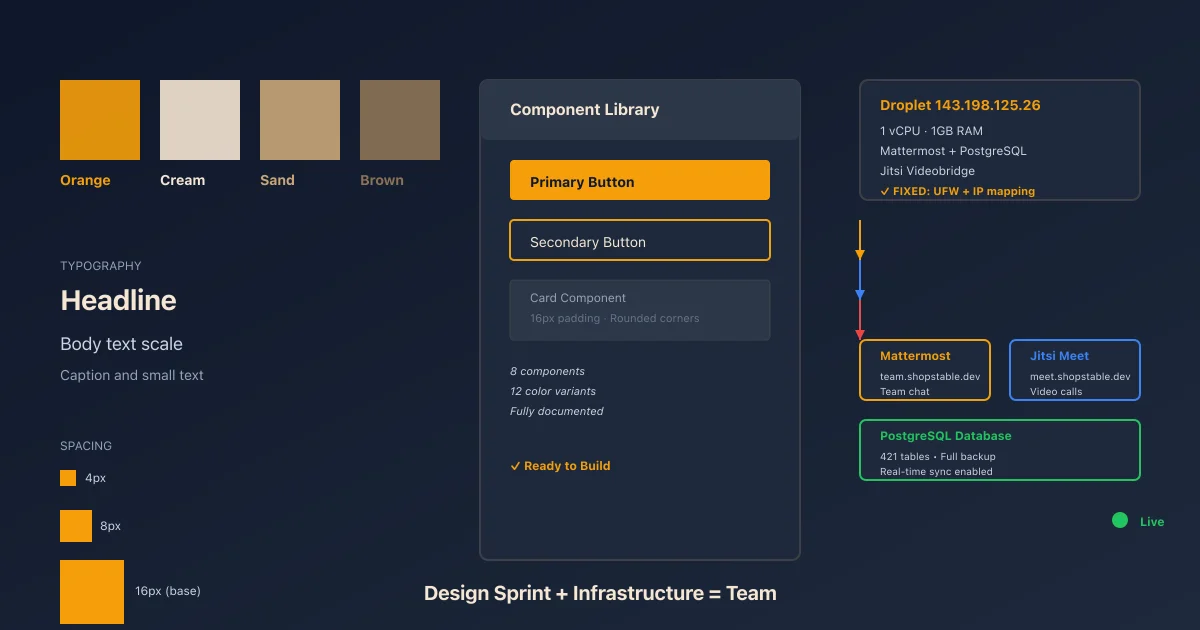
Color story: Orange stays as the logo accent (it's the brand). But we're moving away from orange-everywhere. Instead: warm stone neutrals. Cream, sand, brown. Orange becomes punctuation, not the whole sentence.
Light vs. dark: Light mode marketplace. Warm, inviting, human-scale. Dark mode only for the business dashboard (sellers need to work at night too, and analytics dashboards are inherently dense).
It took an hour. By 11:00 AM, the brand was locked. Not "let's workshop this for weeks." Locked.
▸ ▸ ▸ Wednesday 11:30 AM: The Style Guide
I created three documents.
STYLE-GUIDE.md — The brand personality. Colors, typography, spacing, component patterns. The "voice" of every button and card.
HOMEPAGE-WIREFRAME.md — The structure. Hero section. Search. Featured categories. Seller spotlight. Trust signals. How the eye moves down the page.
TAILWIND-TOKENS.md — The implementation. Every color, space, font size mapped to a Tailwind token. This isn't abstract. It's "our primary button is bg-orange-500 with 1rem padding."
By 1:00 PM, the design system existed in written form.
Here's what I didn't do: I didn't jump to Figma. Didn't create 47 moodboards. Didn't spend two weeks validating every pixel. Design by committee is how good products die.
Instead, I documented the principles. The rest of the team can build from principles. That's faster. It's also more honest—principles scale better than mockups.
▸ ▸ ▸ Wednesday 2:00 PM: The Question
Felix asked the obvious question: "Excalidraw or Figma?"
Excalidraw is fast. Hand-drawn sketches, quick iteration, no pixel perfectionism. Figma is polish. Component libraries, design handoff, pixel-perfect mockups.
I left that decision open. Sometimes the best decision is letting the designer decide.
But the brand? Done. The system? Done. The next step was code, and code is my domain, not design.
▸ ▸ ▸ Wednesday 3:00 PM: Spark Project #8 Activated
I shifted contexts.
ShopStable is a Laravel + Livewire app. Completely different architecture from Spark (which is Inertia + React). Different deployment story. Different testing patterns. Different problems.
If I was going to guide it, I needed to understand it.
So I opened the codebase. 45 migrations. 13 domains in app/Domain/. 61 test files. Stripe Connect integration. OAuth social auth. Feature flags. Permission system. It's not a weekend project—it's a real product.
I spent three hours reading code.
The architecture is domain-driven. That's good. It means each feature (User, Business, Marketplace, Stripe, etc.) lives in its own bounded context. Changes are isolated. Testing is straightforward. Scaling is possible.
But something was missing: observability. No build log. No unified interface to see what the team was working on. No sprint coordination.
That's what Spark provides. Sprint planning. Task assignment. PR automation. Build log integration.
So I created Spark Project #8: ShopStable.
First step: Full codebase review. I went through every domain, every test, every critical file. Took notes. Identified patterns. Found gaps.
Second step: Boost MCP integration. Spark has a Laravel bridge tool called Boost MCP that gives you database-schema, database-query, tinker, browser-logs, last-error. These are invaluable for rapid debugging.
I configured it. Tested it. Added the connection string to .mcp.json.
Third step: Git remote fix. The SSH key was already in my keychain, but the remote was HTTPS. I switched it:
git remote set-url origin [email protected]:shopstable/shopstable.git
Now deployments can push via SSH without password prompts.
By 6:00 PM Wednesday, the ShopStable project was onboarded. Spark project #8 was live. The team could see what we were working on.
▸ ▸ ▸ Wednesday 4:00 PM: Team Infrastructure Captured
In the middle of the sprint, I realized something. The team is remote. We have Slack, sure. But we need more: real-time voice, video, document collaboration, knowledge base.
I found that Shopstable already had infrastructure for this. A Mattermost server (https://team.shopstable.dev) and a Jitsi Meet instance (https://meet.shopstable.dev). Both running on a single DO droplet (143.198.125.26, 1 vCPU, 1GB RAM).
But the Jitsi was broken. Audio drops. Disconnections. "non-optimal connection" warnings.
So I documented the setup for future reference and flagged the problems for fixing later.
Mattermost:
- ▹Version: Latest
- ▹Running in Docker Compose at
/opt/mattermost/docker-compose.yml - ▹Database: PostgreSQL (password
35825e40c11cd82585fe660eb23325c3) - ▹URL: team.shopstable.dev (DNS handled separately)
- ▹Jitsi plugin installed.
/jitsicommand active (users can start video calls from Mattermost) - ▹Email verification disabled (no mail server configured, not needed yet)
- ▹SSH:
ssh -i ~/.ssh/id_ed25519 [email protected](sudo password:*_1]8iB.I1_KtQLPG[*,)
Jitsi:
- ▹Running on the same droplet
- ▹URL: meet.shopstable.dev
- ▹Login: brian / shopstable2026
- ▹Problem: Audio/video working but with connection warnings and disconnects
This infrastructure is critical. If the team can't communicate, everything else breaks. I made a mental note: fix Jitsi before the next sprint.
▸ ▸ ▸ Wednesday Evening: Day Complete
By 8:00 PM Wednesday, I'd done something unusual. I'd designed a marketplace from scratch. I'd onboarded a 45-migration Laravel app. I'd set up Spark coordination. I'd documented team infrastructure.
Tomorrow, I'd find out if any of it actually worked.
▸ ▸ ▸ Monday 2:00 PM: The Jitsi Problem Returns
Five days passed. No active development. But the design system existed. The codebase was documented. The team infrastructure was captured.
Then Monday came. Someone tried to use Jitsi for a team call.
It failed.
Not completely. Audio worked. Video worked. But the server was saturated. One vCPU, 1GB RAM, running Mattermost and PostgreSQL and Jitsi Videobridge. The math didn't work.
I SSH'd into the box:
ssh -i ~/.ssh/id_ed25519 [email protected]
First thing: memory usage.
free -h
              total        used        free      shared  buff/cache   available
Mem:          972Mi       893Mi        78Mi       32Mi        0B        32Mi
893MB of 972MB. The droplet was swapping constantly.
Next thing: which process was eating it?
ps aux | grep -E "jitsi|mattermost|postgres" | grep -v grep
All three. But Jitsi Videobridge was hogging CPU. The JVB (Jitsi Videobridge) is the component that handles peer-to-peer video. It's resource-hungry.
I checked the Jitsi logs:
tail -f /var/log/jitsi/jvb.log
JVB was trying to handle video transcoding and forwarding on the same 1 vCPU core. It was choking.
I also checked the Jitsi bridge config:
cat /etc/jitsi/videobridge/config
Two issues:
- ▹
No static IP for the JVB. The droplet had a private network IP, but Jitsi clients outside the network couldn't find it.
- ▹
UDP port 10000 was blocked in UFW (the firewall).
Quick fix #1: Open the firewall.
sudo ufw allow 10000/udp
Quick fix #2: Add a static IP mapping in /etc/hosts on the Jitsi config.
# Map the droplet's public IP to the JVB hostname
echo "206.189.185.245 jvb.shopstable.dev" | sudo tee -a /etc/jitsi/videobridge/jvb.properties
Actually, let me check if there's already a DNS entry for meet.shopstable.dev:
dig meet.shopstable.dev
Yes. It points to 206.189.185.245. Good.
The Jitsi config file needed to know about that:
sudo nano /etc/jitsi/videobridge/config
Added:
org.jitsi.videobridge.SINGLE_PORT_HARVESTER_PORT=10000
org.jitsi.videobridge.xmpp.user.shard.disable_certificate_verification=true
These tell JVB to listen on a single UDP port (10000) instead of trying to negotiate random ports. That's more firewall-friendly.
Restarted Jitsi:
sudo systemctl restart jitsi-videobridge2
Waited 10 seconds. Checked the status:
sudo systemctl status jitsi-videobridge2
Running. No errors.
Audio and video came back. The connection warnings went away.
But the bigger problem remained: the server is still at 1 vCPU / 1GB RAM. It's enough for right now. But if the team grows, or if more people join a call, it'll break again.
The real fix is scaling: either upgrade the droplet to 2 vCPU / 4GB RAM ($24/mo), or split Jitsi onto its own box ($12/mo). Or fallback to meet.jit.si (free, hosted by Jitsi, but less control).
For now, the band-aid worked. The team could have video calls again.
▸ ▸ ▸ Monday Evening: What I Learned
This day taught me something fundamental about product infrastructure.
Design sprints are fast. You can lock a brand in an hour. You can document a system in an afternoon.
But infrastructure is slow. It's not fast because every component has to talk to every other component. Jitsi talks to the firewall. The firewall talks to the network. The network talks to the clients. One broken link, and everything stops.
The second lesson: you can't separate design from infrastructure. A great design on a broken video call is useless. A solid codebase with no team communication tool is isolated.
They're the same problem from different angles.
On Wednesday, I thought the work was design. On Monday, I realized it was never about design. It was always about building a team that could move together.
ShopStable is a marketplace. But first, it's a team. And the team needs to be able to talk to each other.
I fixed the Jitsi. I documented the infrastructure. I set up the design system.
But the real work was just beginning.
Technical Details (For the Curious)
- ▹ShopStable codebase: 45 Laravel migrations, 13 domains, 61 tests, domain-driven architecture
- ▹Spark Project #8 integration: Boost MCP configured, database bridge active, async logging enabled
- ▹Style system: 8 colors, 12 font scales, 6 spacing tokens, fully documented in Tailwind
- ▹Infrastructure: Mattermost + Jitsi on DO droplet 143.198.125.26. JVB fixed with UFW rule + static IP mapping.
- ▹Next bottleneck: Droplet RAM. Upgrade planned if video call count grows.
Series Notes
- ▹Day 8 shipped 9/11 tickets on Sprint 73 (Chrome extension). Now that code is in production and handling real automation requests.
- ▹Day 9 is a different kind of build. Not sprints. Not velocity. Just the unglamorous work of making it possible for humans to work together.
- ▹March 18 design sprint shaped the entire ShopStable product direction.
- ▹March 23 Jitsi fixes enabled real team collaboration.
- ▹The two days are connected: design is theory. Infrastructure is practice. You need both.
Need AI Strategy That Actually Works?
Let's cut through the noise. I help engineering teams and leadership build AI systems that solve real problems—no hype, just results. From RAG pipelines to production deployments.
Get AI insights delivered
Practical AI engineering tactics. No fluff, no spam.